From zero to running books in an afternoon.
No training course. No migration project. Follow the AI's lead - it configures itself, asks the right questions, and hands you a working system before lunch.
Installation.
Download the installer and run it. The installer handles everything else.
- The installer checks for Microsoft Access. If you have Access 2019 or newer, great. If not, it offers to download the free Microsoft Access Runtime.
- Files install to
%LOCALAPPDATA%\Accessory\. The installer sets the correct Trusted Location so Access doesn't prompt you on every launch. - A Start Menu shortcut is created. The default Accessory Accounting logo is installed - you'll replace it with yours during setup.
- Launch the app. On first run it shows the activation screen. Paste in the license key from your purchase email.
Purchase, install, activate.
After checkout, Accessory sends activation details to the email used at purchase. The app opens in setup mode first, verifies the license, and then walks through company setup before live bookkeeping begins.
The setup conversation.
The AI doesn't show you a wizard. It has a conversation with you, and fills in the wizard on your behalf.
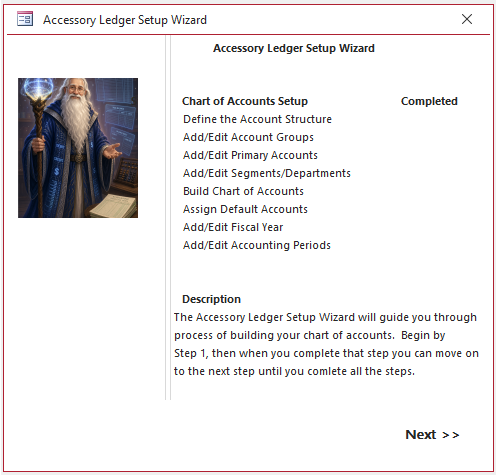
What's happening behind the scenes:
- Company profile is written to the system table.
- A chart of accounts template is selected based on entity type and industry.
- Default tax codes, payment terms, and report formats are applied.
- Your fiscal periods are generated for the next five years.
- The AI marks setup complete and routes you to the main menu.
How long this takes: five to eight minutes for most businesses. The AI handles the form-filling you would normally do yourself.
A normal working day.
Most days with Accessory look like a short conversation.
In Business Owner Mode, the AI always asks before posting. You approve. You stay in control. Once you're comfortable, you can switch to Auto Mode for routine transactions - but only after the system has earned it through weeks of proven accuracy.
Reconciliation, without the stress.
At month-end, ask the AI to reconcile your accounts. It walks through each bank statement with you, matches what it can on its own, and asks about the handful of entries it can't explain.
- An ACH deposit for $2,450 on Oct 12 doesn't match any invoice. Customer deposit'
- A $38 debit at "SQ *CLEANCO" - small recurring amount, possibly janitorial'
- Two Zelle transfers outbound to "Carlos M" for $600 each. Payroll or owner draw'
Tell me what each one is and I'll post them.
Click through the reconciliation screen when you'd rather do it by hand - Accountant Mode lets you work exactly as you would in any traditional package.
Close the books. File the taxes. Start the next year.
- Automatic year-end packet. The AI generates a year-end bundle - P&L, balance sheet, cash flow, A/R aging, A/P aging, GL detail, and 1099 summary - ready for your tax preparer.
- Tax software export. Export to TXF (TurboTax, H&R Block) or IIF format. Your CPA can also connect directly in Accountant Mode.
- Clean close. The AI runs the closing entries, locks the prior year, rolls retained earnings forward, and opens the new year with a clean slate.
- Prior-year lookback. The ledger is always accessible. Ask any question about any past year - "what was gross margin in Q2 of 2024'" - and the AI pulls it instantly.
One afternoon from download to done.
Try it. $350. First year of AI included. Thirty-day money-back guarantee.