General Ledger
Unlimited accounts, full journal, trial balance, period management, year-end close. Audit trail on every entry.
Accessory Accounting is not a chatbot bolted onto a spreadsheet. It's a complete small-business accounting system with AI Assist included out of the box, plus normal accounting screens when you want AI disabled. Here's what's actually in the box.
The assistant knows double-entry bookkeeping, chart of accounts, journal entries, period management, and financial reporting. You describe what happened. It drafts the correct entry, confirms with you, and routes posting through the normal accounting engine.
What it can do today:
The conversation is processed on our own GPU infrastructure. Nothing is sent to OpenAI, Google, or any third-party LLM. Your books are never training data.
A quarter-century of production use is behind the ledger. Every post goes through DAO transactions with begin/commit/rollback, balance verification, and period-lock enforcement.
Unlimited accounts, full journal, trial balance, period management, year-end close. Audit trail on every entry.
Customer invoicing, statements, aging, payment application, partial payments, credit memos, recurring billing.
Vendor bills, approvals, 1099 tracking, check printing, ACH export, cash requirements reporting.
Employee records, tax tables, deductions, direct deposit export, W-2 prep, quarterly filings (941, state).
Multi-location, FIFO / weighted average, reorder points, assemblies, physical count, landed cost.
Financial statements, management reports, tax-prep summaries. All printable, all exportable, all customizable.
85 tables - 1,139 queries - 290+ reports - built, tested, and refined over 25 years of real business use. Accessory Accounting is based on the Accessory Accounting engine ((c) 2000-2002 Real Smart Ledger LLC, licensed 2004 under royalty-free developer terms).
Switch at any time. An owner in Business mode and a CPA in Accountant mode work on the same books without stepping on each other.
Pure conversation. Every transaction flows through the AI. No debits, no credits on screen. Approve before posting, by default.
The full professional toolkit. Raw journal entries, period management, chart of accounts editing, reconciliation screens, closing routines.
After weeks of proven accuracy, the AI posts routine transactions on its own. You review exceptions, not every entry.
Accessory includes operational modules for sales, purchasing, inventory, accounting, payroll, contacts, system management, and import workflows.
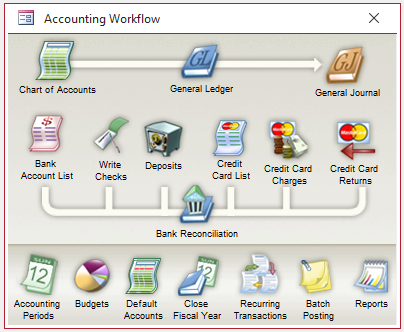
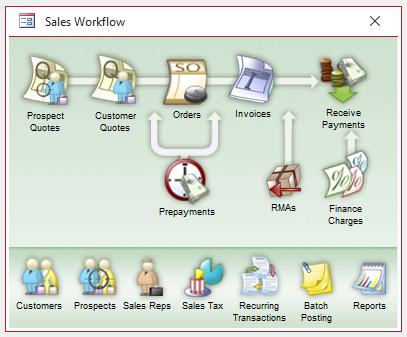
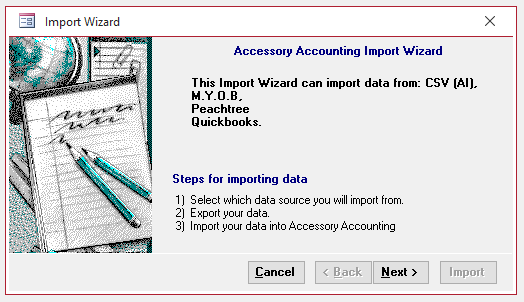
The AI assistant speaks responses in a natural English voice. Ask for your cash balance while you're making coffee. It reads it back. Walk through last month's P&L on a drive between job sites.
Voice uses F5-TTS with a Vocos vocoder, running on our own GPUs. Nothing streams to a third-party voice service. Microphone input for voice commands is planned for the next release.

Every report is a Microsoft Access report object, editable in the Report Designer, exportable to PDF, Word, Excel, or plain text.
Balance Sheet, Income Statement, Cash Flow, Trial Balance, GL Detail, budget vs actual, all variations and all periods.
Customer and vendor aging, sales by item, sales by salesperson, gross margin, inventory valuation, commission statements.
1099 summary and detail, sales tax liability, payroll tax liability, quarterly 941 worksheet, year-end packets.
An accessory is a self-contained module (a .accdb file) that plugs into Accessory Accounting. Need a Stripe importer? A Shopify sync? A cash register? The AI can generate an accessory on demand, and you install it without ever touching the main application.
Your purchase includes the Integrations accessory - editable posting and mapping components for bank feeds, payment processors, e-commerce, POS, payroll imports, documents, and other outside data. You or the AI can adjust mappings and posting rules. Additional accessories can be purchased later.
Single laptop. No internet required. Data stored in a local Access database file (.accdb). Perfect for sole proprietors, mobile businesses, field operations, and anyone who wants their books to live on their own machine.
Point the application at a Microsoft SQL Server database. Up to 200 concurrent users. Same interface, same reports, enterprise-scale storage. Switch over with a simple re-link - no data migration required.
AI features require an internet connection to reach the AI service. The core accounting works fully offline, always. If the internet is down, you can still enter transactions, print invoices, and run reports.
No chain of SaaS subcontractors between you and your books.
First year of AI service included. AI Assist is optional; the accounting engine keeps working without it.