AI that speaks.
The assistant answers in natural English voice. Ask for your cash balance from the kitchen — it reads it back.
Accessory Accounting pairs a 25-year-old double-entry accounting engine with a modern AI assistant. Describe what happened in plain English. It handles the debits and credits.
No chart-of-accounts lessons. No debit/credit drills. Tell it what happened in the words you'd use to your business partner — it knows what to do next.
The assistant answers in natural English voice. Ask for your cash balance from the kitchen — it reads it back.
Double-entry GL, AR, AP, Payroll, Inventory. Period locking. Balance validation on every post. Not a toy.
The books live on your machine. No internet? Keep working. AI features resume when you're back online.
Nothing trains third-party AI. No OpenAI, no Google, no Anthropic in the loop. One provider, one audit target.
The AI understands double-entry bookkeeping, chart of accounts, journal entries, period management, and financial reporting — so you don't have to. Describe what happened. It records it correctly.
Switch at any time. Your CPA can drop into Accountant Mode for month-end while you stay in the conversation.
Plain English only. No debits, no credits, no jargon. The AI drafts every transaction and asks you to approve before it posts.
Full professional toolkit. Raw journal entry forms, trial balance, chart editing, reconciliation screens, period management — the works.
After weeks of proven accuracy, the AI posts routine transactions automatically. Reviews become exceptions, not routine.
Run the installer. If you don't have Microsoft Access, it downloads the free Access Runtime automatically. Enter your license key. You're in.
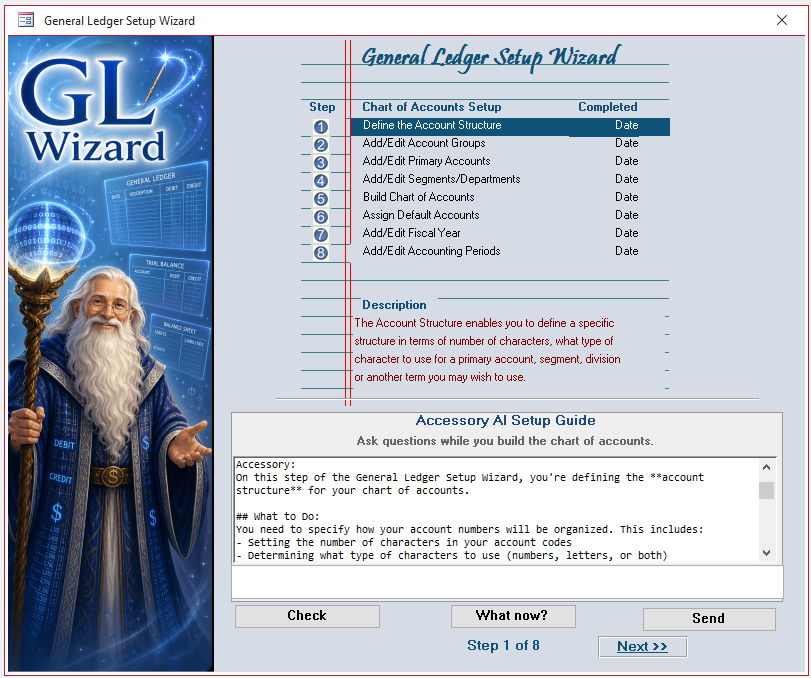
The AI asks about your business — name, type, industry, fiscal year. It picks the right chart of accounts template and configures everything. Five minutes, no wizard fatigue.
Enter transactions in plain English. Ask for reports by voice. Import bank activity through the built-in ETL accessory. The books take care of themselves.
Accessory is built on the Image Accounting PRO engine, in continuous production use for more than two decades. 85 tables, 1,139 queries, 290+ reports, real DAO transactions. We wrapped it in AI. We didn't rewrite it.
Most accounting software rents you the books and rents you the AI separately. Here's how we stack up against the usual suspects.
| Feature | Our pickAccessory | QuickBooks Online | Xero | FreshBooks |
|---|---|---|---|---|
| Price | $350 once + $99/yr AI | $35–$235/mo ($420–$2,820/yr) | $15–$78/mo ($180–$936/yr) | $19–$60/mo ($228–$720/yr) |
| AI assistant | Conversational, voice-enabled | Intuit Assist (limited) | None | None |
| Data ownership | Your machine or your SQL Server | Intuit cloud | Xero cloud | FreshBooks cloud |
| AI trains on your data? | No — local inference | Yes, Intuit's models | — | — |
| Works offline | Yes (full accounting) | No | No | No |
| Extensibility | Unlimited accessories, AI-generated | Apps marketplace | Apps marketplace | Integrations only |
| Multi-user | Up to 200 (SQL Server) | Per-seat pricing | Per-seat pricing | Per-seat pricing |
| Reports included | 290+ built in | Limited, paywalled | Good | Basic |
| Voice interaction | Yes | No | No | No |
| Requires internet | Only for AI features | Always | Always | Always |
Pricing for competitors reflects publicly listed plans and is subject to change. Compare your own quote.
No. The installer detects whether Access is present and, if not, offers to download the free Microsoft Access Runtime. The Runtime is published by Microsoft and takes about a minute to install. Nothing else is required.
The accounting application keeps working, forever, with no restrictions. All 290+ reports, all your data, all your accessories — unchanged. Only the AI features (chat, voice, AI-generated accessories) go offline until you renew. You can skip a year and come back.
On your computer, or on your SQL Server if you're running multi-user. Your transaction data never leaves your machine. The only thing that crosses the network is the text of your chat with the AI assistant, which is processed on our dedicated GPU infrastructure and not used to train any model.
Yes. For a single user or a small partnership, the default local-file mode is fine. For larger teams, switch the back end to SQL Server — Accessory supports up to 200 concurrent users against a SQL Server backend. Same interface, same application, no migration of your data.
An accessory is a plug-in module that extends the core accounting. Every new integration — a bank feed, a Stripe importer, a Shopify sync, a custom workflow — is an accessory. The AI can generate a new one on request. Your first one, the Data Import Framework, ships with the product.
$350 one-time. First year of AI included. Installs in five minutes. Works offline forever.