Bank Feed Importer
Plaid, OFX, or CSV. Pulls daily transactions, matches to existing entries, flags the rest for review.
An accessory is a plug-in module that extends Accessory Accounting. It's a self-contained .accdb file - data, forms, and code - that slots into the main application. The Integrations accessory ships with the app. Need a new integration or a new accessory later? Ask the AI to adjust one, or buy another accessory when you need it.
Most accounting systems lock their extensibility behind an app marketplace - you pay the main vendor, you pay the integration vendor, and neither of them can make changes for you. Accessory flips that model.
The main application is the stable, audited, production-tested core. Accessories are the flexible surface that touches the outside world. When you need new behavior, it goes in a new accessory - never in the core.
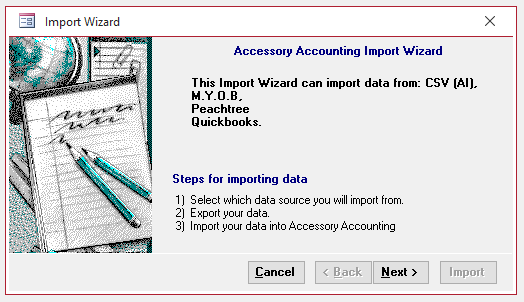
A customizable integration framework that reads outside data, maps it, validates it, and posts it through the accounting engine by transaction type. Use it for bank downloads, payment processor exports, e-commerce reports, POS summaries, payroll imports, vendor CSV files, documents, and other operational data.
The source is exposed. You (or the AI) can edit field mappings, validation rules, import logic, and posting templates directly. There's no black box. It's the same Access that the rest of the application is built with.
The AI has a dedicated code-generation model (Qwen Coder 32B) that writes VBA and builds new accessory files on request. Tell it what you need; it produces a working .accdb that slots into the application.
None of these are required. They're examples of what the AI generates when customers ask. Yours will be tailored to exactly what you need.
Plaid, OFX, or CSV. Pulls daily transactions, matches to existing entries, flags the rest for review.
Stripe, Square, PayPal, Venmo, Zelle. Fees, refunds, and disputes handled correctly.
Shopify, WooCommerce, Amazon, Etsy. Daily sales, tax, fees, and shipping broken out by channel.
A register front-end that syncs back to the home office. Cash drawer, receipt printing, barcode scanning.
Bridges to Gusto, ADP, or Paychex for journal entries and 941 data. Or use the built-in Payroll module.
Mobile receipt capture. OCR extracts vendor, amount, date, and the AI categorizes.
Time, materials, and subcontractor costs tracked per job. Real-time gross margin.
Branded, Word-powered invoice layouts with logos, terms, and custom line-item formats.
Ask the AI. If it's tabular, computational, or a document workflow, it can probably build it.
Every business has at least one workflow no off-the-shelf software handles. Accessories are how you get it handled.